Ride with GPS
Whether you’re planning a Sunday café spin, a longer training ride, or a weekend away, Ride with GPS (RWGPS) is a brilliant tool that makes route planning and navigation simple, accurate, and accessible to everyone.
Here’s why we recommend all members create a free Ride with GPS account and start using it for your rides:
✅ Free & Easy to Get Started
If you do not already have a Ride with GPS account, setting up a free account only takes a minute and gives you access to all the core route-planning and navigation features.
🔗 Sign up for a free account
🗺️ Simple & Accurate Route Mapping
The mapping interface is user-friendly, with turn-by-turn directions, elevation profiles, estimated ride times, and surface types (road/gravel/paths). You can even preview Street View on your planned route.
Ride with GPS offers a fully featured website for route planning, which we recommend using for the best experience. They also provide a mobile app, which is great for navigation and ride tracking. However, please note that route planning within the app requires a paid subscription. If you prefer to plan routes on the go or directly from your phone, the paid option is excellent value and unlocks a range of additional features.
🔁 Syncs with All GPS Devices
Whether you ride with a Garmin, Wahoo, Hammerhead, Bryton, or just use your phone, RWGPS supports it all:
- 📲 Garmin Sync Help
- 📲 Wahoo Sync Help
- 📲 Hammerhead (Karoo) Sync Help
- 📲 Bryton Sync Help (via exporting files)
- 📲 All devices
📁 Collections to Keep Routes Organised
You can group routes into Collections – perfect for planning club holidays, training blocks, or keeping all your favourite local café routes in one place.
🔗 How to create and use Collections
📍 Other Reasons to Use RWGPS
- Route Sharing – easily share a route link with others in the club
- Printable Cue Sheets – for those who prefer a paper backup
- Voice Navigation on Mobile App – no need to keep checking the screen
- Elevation Profiles – know where the hills are before you set off!
- Club Library – we have a shared library of routes for all members
🗺 Upload your Existing Routes
Via the Website:
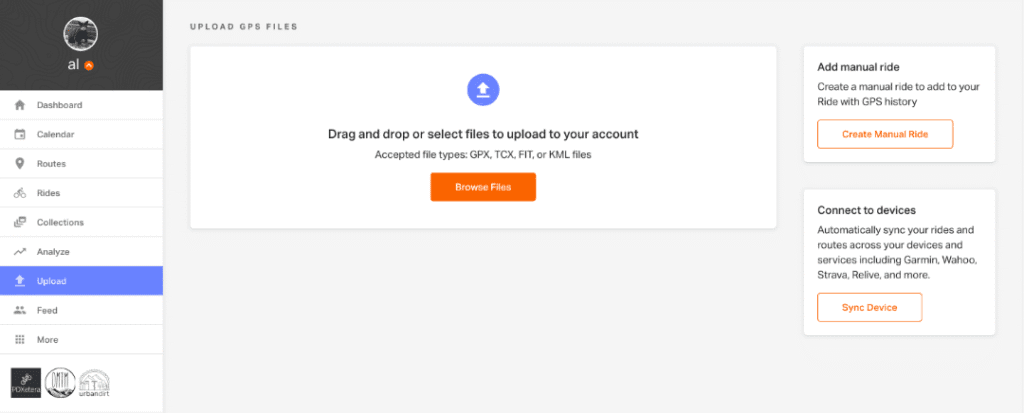
- Select Upload from the left-hand toolbar on your Ride with GPS home screen.
- The Browse Files button will bring up a browser window, allowing the selection of GPS files from your computer.
- Select the files you wish to upload: GPX, TCX, KML, KMZ, or FIT files are all accepted. Multiple files can be selected by holding Control (Windows) or Command (OS X) and clicking on multiple files.
- Once you’ve selected your files, choose if you’d like to Save as a Route
- You can view your files after they are uploaded. Click the three dots in the upper right-hand corner of each ride or route to view the ride or route, edit details, delete the item, or open a route in the Route Planner.
You can also upload routes from the RWGPS app: https://support.ridewithgps.com/hc/en-us/articles/17499515359643-Import-GPS-files-in-the-app
If you’re unsure how to get started or want a quick demo, just ask one of the committee members. We’re happy to help!
➡️ Visit https://ridewithgps.com to get started today.