info@sleafordwheelers.co.uk
07889 233035
Sleaford Wheelers Logo

Ride with GPS

Whether you’re planning a Sunday café spin, a longer training ride, or a weekend away, Ride with GPS (RWGPS) is a brilliant tool that makes route planning and navigation simple, accurate, and accessible to everyone.

Here’s why we recommend all members create a free Ride with GPS account and start using it for your rides:

✅ Free & Easy to Get Started

If you do not already have a Ride with GPS account, setting up a free account only takes a minute and gives you access to all the core route-planning and navigation features.
🔗 Sign up for a free account


🗺️ Simple & Accurate Route Mapping

The mapping interface is user-friendly, with turn-by-turn directions, elevation profiles, estimated ride times, and surface types (road/gravel/paths). You can even preview Street View on your planned route.

Ride with GPS offers a fully featured website for route planning, which we recommend using for the best experience. They also provide a mobile app, which is great for navigation and ride tracking. However, please note that route planning within the app requires a paid subscription. If you prefer to plan routes on the go or directly from your phone, the paid option is excellent value and unlocks a range of additional features.


🔁 Syncs with All GPS Devices

Whether you ride with a Garmin, Wahoo, Hammerhead, Bryton, or just use your phone, RWGPS supports it all:


📁 Collections to Keep Routes Organised

You can group routes into Collections – perfect for planning club holidays, training blocks, or keeping all your favourite local café routes in one place.
🔗 How to create and use Collections


📍 Other Reasons to Use RWGPS

  • Route Sharing – easily share a route link with others in the club
  • Printable Cue Sheets – for those who prefer a paper backup
  • Voice Navigation on Mobile App – no need to keep checking the screen
  • Elevation Profiles – know where the hills are before you set off!
  • Club Library – we have a shared library of routes for all members

🗺 Upload your Existing Routes

Via the Website:

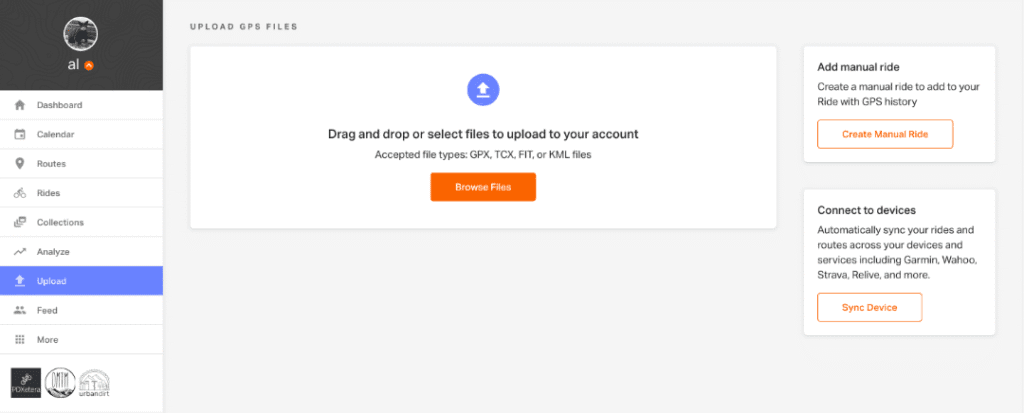
Ride with gps upload existing route
  1. Select Upload from the left-hand toolbar on your Ride with GPS home screen.
  2. The Browse Files button will bring up a browser window, allowing the selection of GPS files from your computer.
  3. Select the files you wish to upload: GPX, TCX, KML, KMZ, or FIT files are all accepted. Multiple files can be selected by holding Control (Windows) or Command (OS X) and clicking on multiple files.
  4. Once you’ve selected your files, choose if you’d like to Save as a Route 
  5. You can view your files after they are uploaded. Click the three dots in the upper right-hand corner of each ride or route to view the ride or route, edit details, delete the item, or open a route in the Route Planner.

You can also upload routes from the RWGPS app: https://support.ridewithgps.com/hc/en-us/articles/17499515359643-Import-GPS-files-in-the-app


If you’re unsure how to get started or want a quick demo, just ask one of the committee members. We’re happy to help!

➡️ Visit https://ridewithgps.com to get started today.

    Comments are closed

    Sponsors & Supporters

    Sleaford Wheelers Logo

    Sleaford Wheelers Cycling Club

    Discover the joy of cycling with a friendly, inclusive community that shares your passion for two wheels.

    Website Archives

    Take a trip down memory lane and explore the history of Sleaford Wheelers with archived versions of our website, dating back to our very first site in 2010.
    © 2025 Sleaford Wheelers. All rights reserved.
    Website Design: Mark Taylor

    Discover more from Sleaford Wheelers Cycling Club Lincolnshire

    Subscribe now to keep reading and get access to the full archive.

    Continue reading